#Building "Jobly": An AI-Powered Slack Bot for Automated & Tailored Job Applications on AWS
Applying to jobs is notoriously tedious. It often goes like this: you find a listing, copy the description, spend 20 minutes rewriting your CV to highlight relevant skills, draft a contextual cover email, and hit send.
To solve this, I built Jobly—a self-hosted Node.js automation bot. It lives inside Slack, uses OpenAI's Responses API (
) to analyze job descriptions and rewrite CVs on the fly, compiles the tailored CV into a print-perfect PDF using Puppeteer, and fires off the application using OAuth2-secured Gmail API.In this post, I will walk you through the system architecture, how the bot functions conceptually, and how to host it securely on AWS.
##System Architecture
The entire pipeline is driven by Slack interactions and runs as a headless event-driven service:
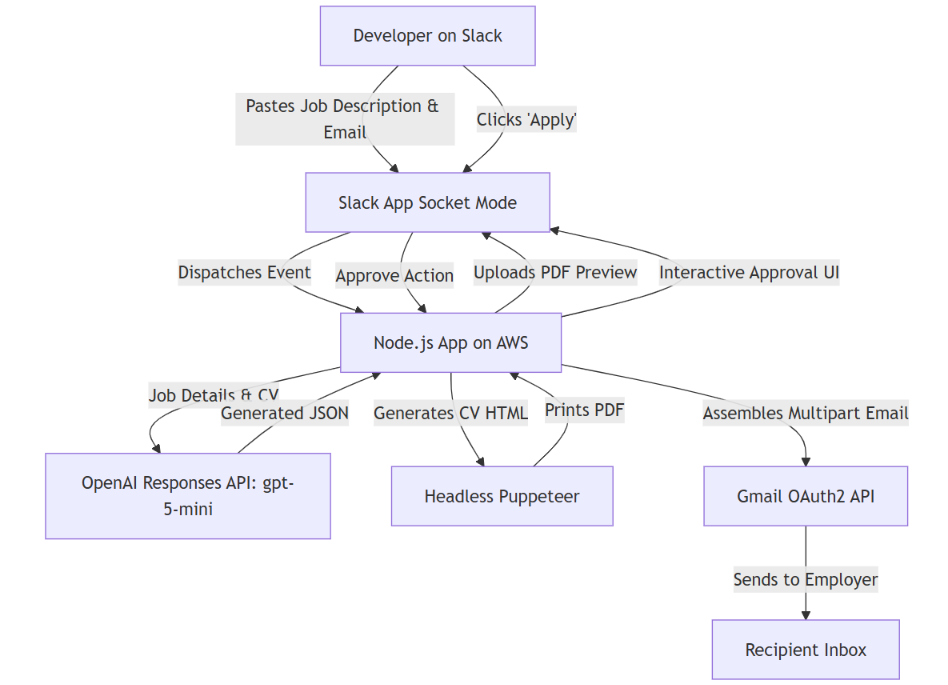
- Slack Socket Mode: The bot establishes an outgoing WebSocket connection with Slack. This means it doesn't need a public IP, DNS records, or open inbound ports. It pulls events directly from Slack's server.
- AI Reasoning Pipeline: The LLM processes the raw job description alongside a master CV, generating a personalized email body, a clean HTML structure of the CV tailored to the job, and a clean PDF filename.
- Puppeteer PDF Rendering: Puppeteer boots a headless Chromium instance, parses the styled HTML CV, and compiles a print-ready A4 PDF.
- Interactive Approval: The bot uploads the PDF to the Slack thread and renders two interactive Block Kit buttons: Apply and Leave.
- Gmail API Integration: Upon user approval, the backend builds a composite MIME message attaching the PDF and sends it directly from the user's Gmail account.
##Technical Features
Here is how the core systems function behind the scenes.
###1. Robust Input Extraction
Rather than requiring strict inputs or forms, Jobly uses a simple double-bracket delimiter format. Developers can copy-paste entire, multi-line job postings with arbitrary spacing or line breaks inside double curly brackets, alongside the recruiter's email. A custom regex parser extracts these fields out of raw messages, ignoring any surrounding message text.
###2. OpenAI Responses API Integration
Unlike legacy Chat Completions APIs that require managing a list of role-based messages, Jobly uses OpenAI's newer Responses API (
). This endpoint separates the system instructions and the user input at the top level, which is ideal for agentic loops.Once the model evaluates the job description and customizes the CV, the bot utilizes a defensive text parser. It scans the response payload to locate the generated text—handling both top-level convenience properties and nested message array structures—to ensure reliable JSON parsing even when output schemas vary.
###3. Print-Perfect PDF Rendering (CSS Paged Media)
To ensure the dynamically generated CV is print-perfect and avoids awkward formatting on paper, the AI produces clean HTML using CSS Paged Media.
- Margins are fixed to precise page dimensions.
- Headings are configured to avoid being orphaned at the bottom of a page.
- Lists and list items are styled to prevent splitting across page boundaries.
Puppeteer loads this styling headlessly and compiles it into a clean, professional A4 PDF.
###4. Assembling and Sending Multipart Emails
After previewing and clicking "Apply", the backend structures a Gmail request as a complex MIME message:
- A top-level container routes the email.
- An alternative body packages both a plain text and a styled HTML version of the cover letter.
- An attachment block encodes the binary PDF buffer as a base64 string.
- A personal email signature block is dynamically injected at the bottom.
##Security Audit: Keeping the Repo Public
Because this project is hosted in a public GitHub repository, security is paramount. The codebase is configured to guarantee zero hardcoded secrets:
- Slack Tokens: All Slack tokens and signing secrets are read exclusively from runtime environment variables.
- Google Credentials: OAuth2 Client ID, Client Secret, and Refresh Tokens are loaded via process environment variables.
- LLM API Keys: The OpenAI API key is retrieved dynamically from the runtime environment.
- Git Safety: The project repository contains a file mapping all local configuration variants, ensuring secret files never accidentally get pushed to GitHub.
##Deploying Jobly to AWS
Since Jobly runs via Slack Socket Mode, deployment is incredibly simple because we don't need to configure a Load Balancer or open inbound ports. The bot acts as a WebSocket client, polling Slack.
###Option A: AWS EC2 (Easiest)
- Launch instance: Spin up a clean or instance using Amazon Linux 2023 or Ubuntu.
- Install Node.js & Chromium Dependencies: Install node modules along with the graphics and sound libraries required by Puppeteer to run Chromium headlessly.
- Configure Environment Variables securely: Use AWS Systems Manager (SSM) Parameter Store to map variables securely to the runtime instead of writing plain text secret files onto the server disk.
- Process Management: Run the application using a process manager like PM2 to keep the bot alive continuously and restart it on system reboots.
###Option B: AWS ECS (Dockerized Container)
If you prefer running containerized workloads:
- Create Dockerfile: Build a Dockerfile that packages Node.js and Chromium dependencies.
- Push to Amazon ECR: Create an Elastic Container Registry repo and push your built image.
- Deploy on ECS Fargate: Run the task on AWS ECS Fargate.
- Secret Integration: Map variables directly in your ECS Task Definition from AWS Secrets Manager, injecting them securely into the container at launch.
##Conclusion
By treating Slack as a lightweight, interactive UI, and combining it with Puppeteer and LLMs, Jobly transforms a time-consuming administrative workflow into a simple Slack notification. Best of all, thanks to AWS SSM and ECS, it can be deployed securely as a public open-source project without exposing a single sensitive credential.
Feel free to fork the repository, load your CV, and automate your job applications!